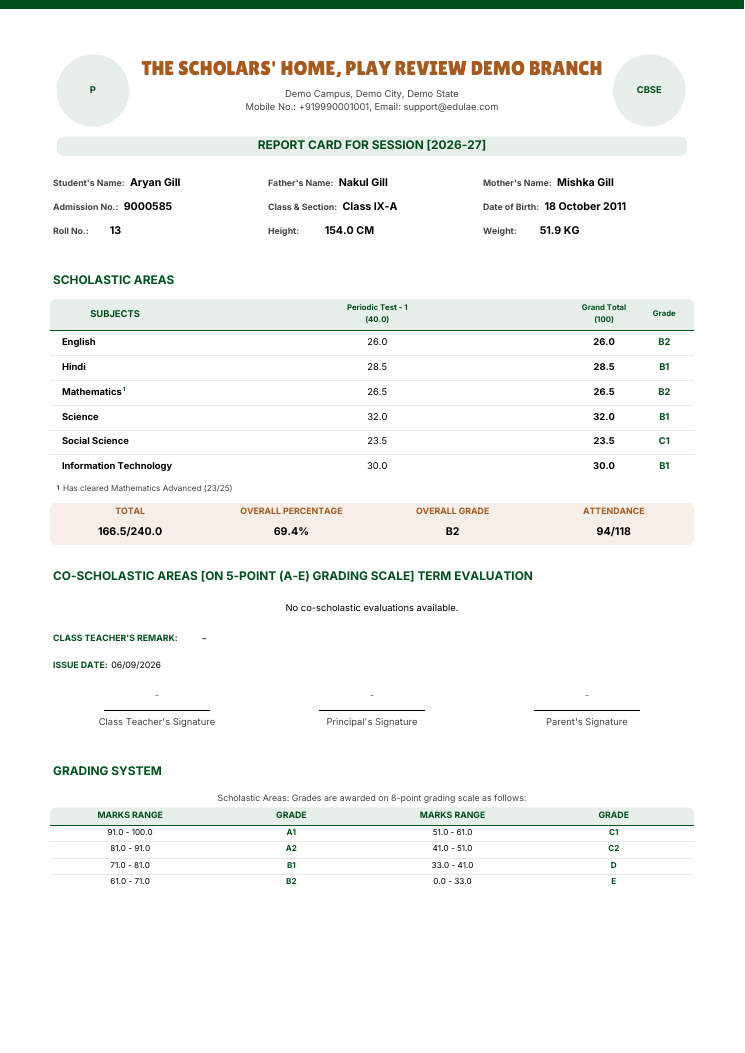
Set up each class's report card yourself, with add-on papers such as Mathematics Advanced marked on the card
Class IX report card with Mathematics marked and a footnote for Mathematics Advanced
Examination
Report card layout rules for each class
You can now decide, class by class, where each subject prints on the report card, whether it counts toward the total and percentage, and which add-on papers such as Mathematics Advanced earn a small number next to their parent subject once a student clears them. Give a subject its own block on the card, keep an optional subject out of the total, or copy a finished setup to another class or session. Open Examination, then Report cards, then Subject rules.
Close-up of the marked subject row and its footnote under Scholastic Areas.
The same class for a student below the bar: no marker, no footnote, same total out of 240.
Add-on numbers follow each student
When a student clears more than one add-on paper, the small numbers on their card run 1, 2 in subject order. A student who cleared only one add-on always sees 1.
Co-scholastic activities stay with their class
Report cards now show only the co-scholastic activities set up for the student's class, instead of every activity in the school.
Marks or grades on assessment schemas
When setting up an assessment schema, you can once again choose whether it is scored in marks or grades and pick the grade scale used to show grades in mark entry and on report cards.
Platform
Accreditation evidence for every step of Plan, Do, Check, Act
Every accreditation parameter now lists what to prepare under all four steps of the Plan, Do, Check, Act cycle, so no step is left empty in the requirement checklist. When you link a document, you pick the real standard (S1 to S14) and parameter, and compliance documents open in a cleaner side panel on the Evidence page.
A cleaner Compliance section
The Compliance section now matches the rest of ScholaRise: one floating toolbar with the section tabs, search and filters, flat lists that scroll beneath it, and the same detail panels and phone layout you see in Students and Library.
Toolbars that stay clear while you scroll
The toolbar on the Teachers, Employees and Admission Inquiries pages now stays readable as you scroll, and the Filter and Sort buttons no longer disappear when switching between Teachers and Employees.
Finance
Fee due dates for parents
Parents can now see the due date for every fee term, with overdue terms clearly flagged.
Book a demoA guided walkthroughWeb · iOS · AndroidAvailable across India
The next step
See ScholaRise in your school.
A real walkthrough with someone who actually runs a school — we'll map what fits your
campus today and what's worth phasing in over the next year.